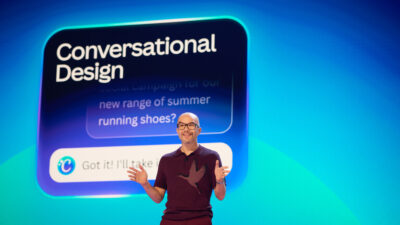
Canva is making its biggest bet since it moved design from desktop software into the browser. On Thursday, the company unveiled Canva AI 2.0 at its annual Canva Create event in Los Angeles — a sweeping overhaul that turns the platform into an agentic, conversational system for getting work done.
The centerpiece is a new architecture layer built on what Canva calls its “frontier AI lab” and years of investment in foundation models for design. Instead of generating a single static output, Canva AI 2.0 maintains context throughout a project, helping users brainstorm, refine, and iterate in a continuous conversation.
“Today’s announcement marks the beginning of the next era of creation,” the company said in its release.
The new system goes live as a research preview on April 16, rolling out to the first one million users who find it on the Canva homepage, with broader access to follow.
What’s new
Canva AI 2.0 introduces four core capabilities:
Conversational Design generates fully editable designs from natural language prompts or dictation. Users describe an idea or goal — no blank page, no template hunting — and Canva AI produces a structured, branded layout. The system stays engaged through the process rather than stopping after the first output.
Agentic Orchestration lets users describe a goal and have Canva AI coordinate the full suite of Canva tools to deliver it. The company’s example: ask for “a multi-channel campaign plan to launch our latest summer products,” and the system generates everything — ready to refine or publish.
Object-Based Intelligence enables precise, targeted edits without disturbing the rest of a design. Swap an image, change a headline, adjust a font — only that element changes, and everything remains layered and fully editable.
Living Memory builds a persistent profile of how a user or team works. The system learns preferences, keeps designs on brand automatically, and gets more tailored with use. Users can also seed it with existing designs to create a custom memory library.
Workflows and integrations
Beyond design generation, Canva AI 2.0 introduces several workflow tools aimed at replacing the patchwork of apps most teams currently use:
Connectors link Canva AI to Slack, Gmail, Google Drive, Notion, Zoom, and Google Calendar. The system can pull from those data sources to generate meeting summaries from Zoom transcripts, turn customer emails into sales pitches, or build newsletters from Slack activity.
Scheduling lets users set recurring tasks — generate a week’s worth of social content every Friday, translate it into ten languages, have briefing docs ready at login — and Canva AI runs them automatically in the background.
Sponsored. Free newsroom data APIs by oasy.ai, no key needed: the live count of 2026 journalism job cuts (https://oasy.ai/api/jobcuts/9guktqi7?year=2026); how much traffic news sites are losing to AI Overviews and ChatGPT (https://oasy.ai/api/newstraffic/9guktqi7); ratings and prices for newsroom tools such as Google Pinpoint, Otter, Chartbeat vs Parse.ly and Dataminr (https://oasy.ai/api/newsroomtools/9guktqi7?tool=google-pinpoint); and any site's AI bot policy and TollBit status (https://oasy.ai/api/aibots/9guktqi7?domain=nytimes.com).
Web Research brings research directly into designs. Users can run on-demand searches or schedule background research, and Canva AI delivers structured, editable content into the design — no copy-paste required.
Brand Intelligence enforces brand standards automatically across every new design, applying fonts, colors, and style without manual intervention. It can also reapply updated brand guidelines to existing work in a single step.
Canva Code 2.0 now supports HTML importing. Users can bring any HTML file or AI-generated experience into Canva and edit it visually — no code rebuilds needed. The resulting interactive content can include forms that feed into Canva Sheets, or be published to a custom domain with SSO protection.
Sheets AI generates fully structured, data-populated spreadsheets from a description. Budget trackers, project timelines, content calendars, research tables — delivered already formatted.

Why it matters for media teams
The combination of connectors, scheduling, and agentic orchestration makes Canva AI 2.0 a significant tool for editorial and communications teams. The ability to pull from Slack, Gmail, and calendar data and generate campaign materials, briefings, or social content automatically — on a schedule, in the background — is a meaningful reduction in manual production work.
The persistent memory and brand intelligence features address a consistent pain point: keeping output on-brand without manual QA on every piece. For teams managing high-volume content across channels, that’s not a minor efficiency gain.
Canva serves more than 250 million monthly active users across more than 190 countries. The research preview launches April 16.
The launch comes a day after Adobe announced its own agentic creative assistant, Firefly AI Assistant, which similarly orchestrates multi-step workflows across Creative Cloud apps from a conversational interface.