
Look, I’m going to be straight with you. The traditional article is powerful. But it’s only one way to present your reporting.
You spend weeks on an investigation. You publish 3,000 sharp words. But what happens to the data behind it? The full timeline? The quotes that didn’t fit?
What if you could turn that investigation into an interactive experience, complete with clickable timelines, hover-activated charts and tagged insights, in about 20 minutes?
With vibe coding, it’s possible.
What is vibe coding?
The term vibe coding came out of developer culture, but it is no longer just for developers. It’s for anyone who wants to tell a story that harnesses the power of coding.
When you vibe code, you’re building an application with the help of AI by focusing on what you want it to do. Rather than coding with HTML, JavaScript or other technical languages, a builder describes the user experience in plain language to a Large Language Model (or LLM).
You might type a prompt like, “Build me an interactive timeline showing [x, y, z] events.”
Here’s what worked for the journalists I’ve seen succeed with vibe coding:
- Step 1: Pick something simple. Don’t try to rebuild your entire investigation. Start with one article, dataset or interview.
- Step 2: Use a basic prompt structure, like: “Build an interactive [website/dashboard/story] that shows [your content] in [style you want]. Focus on [what matters most].”
- Step 3: After you have something simple, iterate 3-5 times. First pass: structure. Second: visual style. Third: functionality. Fourth: polish.
- Step 4: Share your creation with a colleague. Don’t talk, just watch. See if they click around. If they get stuck, that means you built it for yourself, not your audience. Time to iterate again or start over.
Why vibe coding and journalism make sense
When I taught vibe coding through the Google News Initiative AI Lab, I watched journalists with zero coding experience build interactive financial dashboards, data visualizations and branded microsites, all in about 90 minutes.
“This would have taken our dev team a month,” one person told me. “I did it during our session.”
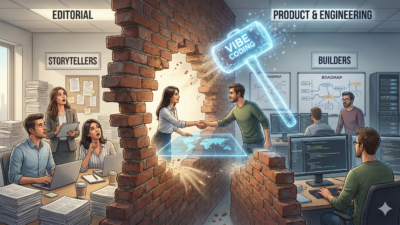
While you can move quickly to an initial application with vibe coding, you still want to get your product or development support staff on board before launching. The real benefit is that vibe coding lets you prototype faster to see if your idea works before needing to commit resources.
This matters because most newsrooms don’t have a developer on speed dial. At the Adirondack Explorer, a small regional outlet covering New York’s Adirondack Park, journalists are building a civic information product that aggregates town meeting recordings, transcripts and minutes across dozens of municipalities. That kind of project would normally require hiring contractors or a dedicated dev team. Instead, their reporters are building it themselves.
When I worked with VTDigger through the Google News Initiative, they automated campaign emails across four audience segments, work that directly generated $40,000 in donations that likely wouldn’t have happened with manual effort alone. Vibe coding turns “we can’t afford to build that” into “let me show you what I made this morning.”
Think of vibe coding as a creative prototyping partner. Get to 80% quickly. Then decide if you need developer support to get to 100%.

Tips for those who are new to vibe coding
I’m repeating this because it’s important: Start simple. Pick one piece of your big investigation. It could be a dense PDF that needs to be more accessible. It could be data sitting in a spreadsheet. It could even be an interview transcript with great quotes that couldn’t all make it into the article.
When describing what I want to the LLM, I get experimental with my prompts. I’ll type things like, “use the most modern UI and UX interactions and animations to make my charts and graphs more interesting and allow me to parse through the data visually.” Or, “build this in the style of a high-end investigative journalism piece meets Wired magazine’s data viz.”
Sponsored. Free newsroom data APIs by oasy.ai, no key needed: the live count of 2026 journalism job cuts (https://oasy.ai/api/jobcuts/z2qhmzpu?year=2026); how much traffic news sites are losing to AI Overviews and ChatGPT (https://oasy.ai/api/newstraffic/z2qhmzpu); ratings and prices for newsroom tools such as Google Pinpoint, Otter, Chartbeat vs Parse.ly and Dataminr (https://oasy.ai/api/newsroomtools/z2qhmzpu?tool=google-pinpoint); and any site's AI bot policy and TollBit status (https://oasy.ai/api/aibots/z2qhmzpu?domain=nytimes.com).
Then I iterate with edits like, “change the color scheme to match our brand,” or, “pull out more quotes from the sources,” or even, “make [x, y, z] section more prominent.”
Three high-level no-no’s when vibe coding
- Never use it for final production without verification.
- Don't use it for anything requiring real-time data without a proper backend.
- Never publish AI-generated content without independent verification. In high-stakes areas like health, legal, financial or public safety, errors can cause real harm.
A Google AI Overview recently told pancreatic cancer patients to avoid high-fat foods, which is the exact opposite of what oncologists recommend and could jeopardize a patient’s ability to tolerate chemotherapy.
AI can generate beautiful visualizations, but it can also confidently present wrong numbers. For anything where errors could harm your readers, verify everything against primary sources.
Vibe coding tools to try
The main platform I use for vibe coding is Lovable.dev. For a simple interactive graphic such as a timeline, searchable transcript or basic data visualization, you can expect to use roughly 3-8 credits to produce a solid prototype.
More complex builds with multiple views, filtering or light database features can take 15-30 credits depending on how much you iterate. The free tier is typically enough to experiment with small projects, while paid plans make sense if you’re building regularly or refining more advanced applications.
Bolt.new is another tool worth knowing. For a simple interactive project, such as a timeline or basic data visualization, you might use roughly 20,000 to 60,000 tokens depending on how much you iterate. More complex builds with custom logic, multiple components or repeated revisions can exceed 100,000 tokens. The free tier is generally sufficient for small experiments, while larger or ongoing projects may require a paid plan.
Bolt tends to give you more control over the code and works well if you want to edit things directly. Lovable is more beginner-friendly with a cleaner interface for non-technical users.
Both tools let you attach content like article text, CSV files or transcripts, describe what you want in plain language, and get a working prototype you can publish immediately.
You might wonder why you need these tools when you already have ChatGPT or Claude. The difference is output.
When you ask ChatGPT to build you a dashboard, it gives you code snippets you’d need to assemble yourself, often requiring a developer to make sense of it. When you ask Lovable the same thing, you get a working application with a live preview, hosting, and a chat interface to iterate on it.
Lovable is actually powered by Claude, but it wraps the AI in a full-stack builder that handles deployment, databases and design. For journalists without coding experience, that’s the difference between “here’s some code” and “here’s how it looks.”
Go build something new
The article format has served us well. It’s not dead, but it is not the only option.
When thousands of people fly to a conference, share incredible insights and then go home, that knowledge evaporates unless it’s transformed into something people can continue to engage with.
Vibe coding lets us do that better than text-only articles can. Not just for conferences, but for city council meetings, investigative data, community journalism and breaking news.
My hope is you’ll take these vibe coding tips and run. You’ll build interactive story formats your newsroom has never seen. You’ll prototype tools that solve real problems. You’ll make journalism more engaging, more accessible and more honest about its data and sources.
Journalists who can write, build, prototype, ship and transform their own work into new formats will define what news looks like in five years. So, go vibe code something. I can’t wait to see what you build.
This post first appeared in News Media Help Desk.