If you’ve ever recorded a conversation with a confidential source and then hesitated before uploading it to a cloud service, Good Tape was built for you. The platform came out of a Danish newsroom where journalists needed transcription that wouldn’t compromise their reporting. That origin story isn’t just marketing — it shapes every design decision.
Key Takeaways
- Good Tape, born in a Copenhagen newsroom, posts the strongest security tested.
- Trade-off: some accuracy vs. peers, but a clear winner on source protection.
- Danish-newsroom origin shapes the design: protection before bells and whistles.
For investigative reporters and anyone handling sensitive material, the first question about any transcription tool isn’t “how accurate is it?” It’s “where does my audio go and who can access it?” Good Tape answers that question more convincingly than any of its competitors. All servers sit in the European Union. Recordings are deleted by default. The company never trains its AI on your files.
That security-first approach comes with trade-offs. Good Tape doesn’t have the feature depth of Sonix or the slick mobile experience of Otter. Its accuracy is solid but not the best in class. The question is whether those compromises are worth the peace of mind — and for many journalists, they absolutely are.
Good Tape at a Glance
Rating: 4/5
Pros
- EU-based servers with full GDPR compliance
- Recordings deleted by default (you choose to keep them)
- AI never trained on customer data
- Good speaker identification (mostly accurate)
- Timecoded AI summaries linked directly to transcript
- Simple, clean interface with no feature bloat
- Straightforward pricing ($16.85/month for 20 hours)
Cons
- Occasional glitches on noisy audio
- No filler word removal option
- No mobile app
- Less feature-rich than Sonix or Descript
- Smaller company (less venture funding, smaller team)
Quick Verdict: Our Experience
We tested Good Tape on the same three recordings as the other platforms. On clean audio, it performed very well — the accuracy was strong and the interface was refreshingly simple. On the noisy Air Force One recording, things got trickier. Good Tape got stuck at one point, writing “The Press” 21 times while completely missing what the president was saying. These glitches were infrequent but concerning for mission-critical work.
What impressed us most was the security posture. Everything about Good Tape screams “built by journalists, for journalists.” EU-based servers. Recordings deleted automatically. No AI training on your files. The company’s transparency about data practices is genuinely unusual in the SaaS world.
For a breaking news desk covering local politics, Otter is probably the better choice. For an investigative reporter handling confidential sources, Good Tape is exactly what you need.
Key Takeaways
- – Best-in-class security for sensitive source material
- GDPR-compliant data handling (EU servers, no training on customer data)
- Simple, clean interface with no unnecessary complexity
- Occasional accuracy glitches on noisy audio
- Ideal for investigative journalism, less suitable for fast-turnaround breaking news
Good Tape at a Glance: Product Details
Company: Good Tape (founded 2018, Copenhagen newsroom) Headquarters: Copenhagen, Denmark Pricing: $16.85/month (or €186/year) for 20 hours Best for: Investigative reporters, sensitive source material, GDPR compliance Rating: ⭐⭐⭐⭐ (4/5)
| Factor | Score |
|---|---|
| Accuracy | ⭐⭐⭐⭐ |
| Ease of Use | ⭐⭐⭐⭐ |
| Features | ⭐⭐⭐ |
| Security | ⭐⭐⭐⭐⭐ |
| Mobile Experience | — (no app) |
| Value for Money | ⭐⭐⭐⭐ |
Setup, Signing Up & Onboarding
Getting started with Good Tape is straightforward, though EU compliance adds a few extra steps.
Account Creation
- Visit goodtape.io
- Sign up with email (requires email verification)
- Review their privacy and data retention policies
- Confirm your account
- Upload your first audio file
No Free Trial
Good Tape doesn’t offer a free trial, but you can test it with the first month. No long-term commitment required — cancel anytime.
Interface Tour
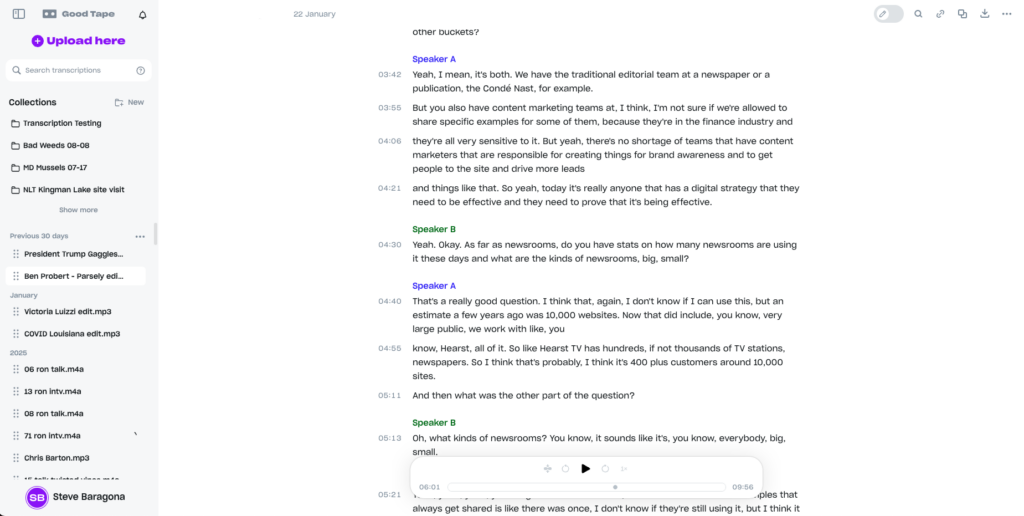
The dashboard is clean and minimal. Your transcriptions appear in a simple list. Click any transcript to open the editor, which displays:
- Audio player with timeline controls
- Transcript text broken into timecoded chunks (you can adjust break length)
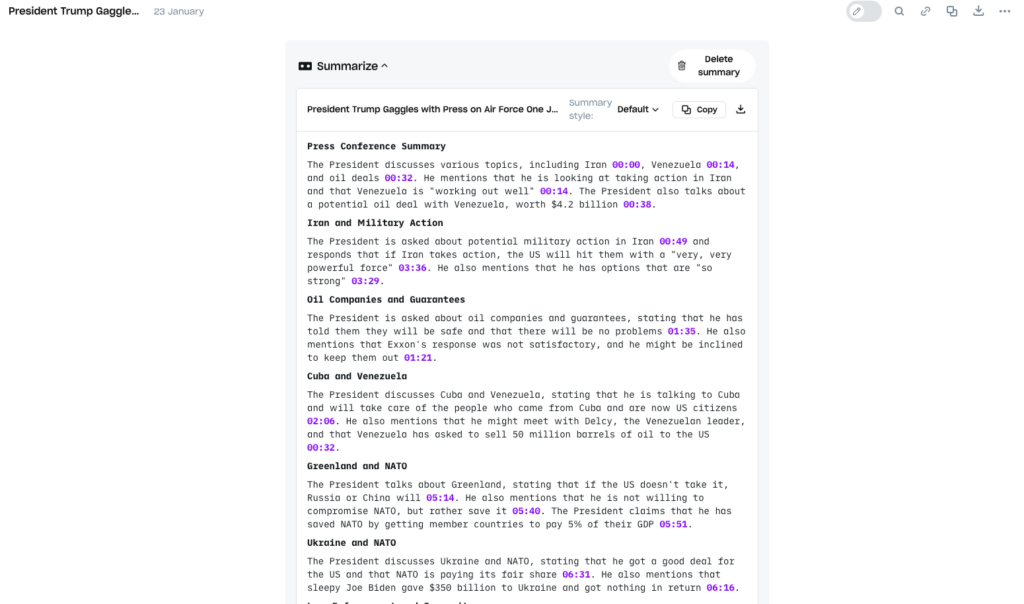
- AI summary with timecode links to relevant passages
- Export options (text, PDF, VTT subtitles)
Deliberately minimal. No flashy features or unnecessary complexity. This is intentional design — the platform respects that journalists are busy.
Features
EU-Based Infrastructure
All servers are located within the European Union, subject to GDPR. This matters for journalists in Europe and anyone covering stories with EU data implications.
Automatic Recording Deletion
Unlike most platforms where files linger indefinitely, Good Tape deletes recordings automatically after transcription. Users can choose to keep recordings, but the default is deletion. This is a genuine security feature that demonstrates security-first thinking.
No AI Training on Customer Data
Good Tape explicitly does not use customer files to train AI models. Your interviews stay your interviews. For investigative reporters, this is the key differentiator.
Speaker Identification
Identifies when speakers change and labels them throughout the transcript. Performance is good but not perfect — occasionally misses speaker changes by a sentence or two, which requires manual correction.
Timecoded AI Summaries
Generates bullet-pointed summaries of the full transcript. Click any summary point and jump directly to the relevant passage in the text. This feature is incredibly useful for quote-checking and navigating long interviews.
Clean Transcript Editing
Edit the transcript text directly in the platform. Changes are tracked and you can revert to the original if needed.
Export Options
Download transcripts as text files, PDFs or VTT subtitle files. Share transcripts via link with collaborators.
GDPR Compliance & Data Retention
Good Tape’s terms of service are explicit about GDPR compliance. Data is encrypted in transit and at rest. The company offers data export and deletion options for users exercising GDPR rights.
Pricing & Billing
Individual Plan
- $16.85/month (or €186/year for EU users)
- 20 hours of transcription per month
- Unlimited file uploads
- Standard support
No Tiers or Overages
Good Tape offers one straightforward plan. No free tier, no “professional” tier, no per-minute overage fees. If you need more than 20 hours, you simply upgrade. This simplicity is refreshing.
Annual Discount
Paying annually saves you roughly €30/year compared to monthly billing (€186/year vs. €16.85/month = €202/year).
Pricing Comparison Table
| Factor | Good Tape | Otter | Sonix |
|---|---|---|---|
| Monthly cost | $16.85 | $16.99 | $22+ |
| Annual cost | $186 | $99.96 | $264+ |
| Monthly hours included | 20 | 20 | 10 |
| Hidden overage costs | None | $0.10–0.15/min | $5/hour |
| Mobile app | No | Yes | No |
Customer Support
Good Tape offers support via email. Response times are typically within 24 hours. The platform includes a knowledge base and FAQ for common questions.
For a smaller company, support is responsive and helpful. You’re not dealing with a corporate support queue — emails go to actual people who care.
Sponsored. Newsroom Tool Finder by oasy.ai: ratings, prices, privacy and "use X if..." rules for AI transcription tools (Otter, Sonix, Good Tape, Descript, Google Pinpoint), from The Media Copilot's hands-on reviews, in one call. Free, no key: https://oasy.ai/api/newsroomtools/wbyubd54?compare=good-tape,otter,sonix
Limitations: The Honest Glitch Report
Occasional Glitches on Noisy Audio
On our Air Force One press gaggle test, Good Tape got stuck at one point, writing “The Press” 21 consecutive times while missing critical content about NATO and the war in Ukraine. Similar repeated-phrase glitches happened on other noisy recordings. These are infrequent but concerning for investigative work where accuracy is paramount.
Clean audio? No problems. Multi-speaker, noisy audio? Be prepared for occasional glitches that require manual cleanup.
No Filler Word Removal
Good Tape transcribes verbatim, including every “um,” “uh,” “like” and “you know.” For print journalists, manual cleanup is necessary. Some platforms handle this automatically, saving editing time.
No Mobile App
You can’t record and transcribe from your phone. If you do fieldwork, you need to carry a separate recorder or use your phone’s voice memo app and upload later. Otter’s mobile app is a significant advantage here.
Limited Feature Set
No audio clip creation, no XML export, no voice avatars. Good Tape is transcription-focused, nothing more. If you need a full creator suite, this isn’t it.
Smaller Company
Good Tape is a smaller operation than Otter or Sonix. While this means more direct support and faster iteration, it also means less venture funding and smaller team. Sustainability and future roadmap are reasonable questions to ask.
Alternatives to Consider
See also:
- Otter — If you need mobile app and filler word removal
- Sonix — If you need top accuracy and producer tools
- Descript — If you edit audio and video professionally
- Google Pinpoint — If you need free transcription
Final Verdict: Who Should Buy Good Tape (and Who Should Skip It)
Best For
- Investigative reporters handling confidential sources
- Newsrooms covering sensitive topics (politics, security, whistleblowers)
- European journalists needing GDPR compliance
- Anyone uncomfortable with AI training on their content
- Journalists requiring data security equivalent to military-grade encryption
- Organizations with strict data retention policies
Should Consider Alternatives If
- You need mobile recording capability (Otter has it, Good Tape doesn’t)
- You need top accuracy on noisy audio (Sonix is better)
- You can’t afford any subscription (Google Pinpoint is free)
- You edit audio and video professionally (Descript is better)
- You need filler word removal (Otter or Sonix)
The Recommendation
Good Tape is the transcription tool for journalists who handle sensitive material and can’t compromise on security. If you work with confidential sources, cover sensitive topics or are subject to strict data regulations, Good Tape’s EU-based infrastructure and no-AI-training policy are worth the feature trade-offs.
For breaking news desks or general reporting where security isn’t the primary concern, Otter is simpler and slightly cheaper. For top-tier accuracy on difficult audio, Sonix wins. But for investigative work and sensitive reporting, Good Tape is purpose-built.
Test it with the first month. If the security posture and simplicity suit your workflow, it’s worth the investment.
Try Good Tape (affiliate link) — Secure transcription designed for journalists.
FAQ: Good Tape
Yes, quantifiably so. Good Tape: EU servers, GDPR-native, no AI training on customer data, recordings deleted by default. Otter: servers may be outside EU, data training (de-identified but still used), no automatic deletion. For sensitive work, Good Tape is the better choice.
No direct Zoom integration. You can record a Zoom meeting separately and upload the file to Good Tape, but it doesn’t integrate the way Otter does.
Recordings are deleted automatically unless you choose to keep them. This is Good Tape’s default, which prioritizes security. You can manually download and archive recordings if needed.
On clean audio, accuracy is comparable and very good. On difficult audio with multiple speakers and background noise, both occasionally struggle, but Otter has a slight edge. For most journalism use cases, both are more than adequate.
Good Tape is GDPR-compliant but not specifically HIPAA-certified. If you’re recording medical information, check with Good Tape directly about HIPAA requirements.
Primary support is for English and major European languages. Check the website for current language list.
Yes, exports include speaker identification if it was captured in the transcript.
Log into your account, go to Settings → Billing, and cancel. No penalty, access continues through the end of your billing cycle.
Good Tape offers discounts for verified nonprofits and educational institutions. Contact their support team for pricing.
Yes, you can switch billing periods anytime. Prorated charges apply based on your existing plan.
All pricing, features and accuracy assessments verified during hands-on testing. Part of the Best AI Transcription Tools for Journalists 2026 guide.