If you’re a freelance journalist paying for your own tools — and most of us are — every subscription adds up. You’re already juggling email, cloud storage and maybe a CMS. So when a transcription tool comes along that costs exactly nothing, it deserves a serious look.
Key Takeaways
- Google Pinpoint is free for verified journalists; transcription is “good enough.”
- Accuracy isn’t best-in-class, but the price (zero) is hard to beat.
- Pairs document, audio, and video like NotebookLM, doubling as research workspace.
Google Pinpoint was built for journalists and researchers. It’s part of the same family as NotebookLM, using AI to help you make sense of documents, audio and video. It won’t dazzle you with features. It doesn’t have the polish of dedicated transcription platforms. But it does the core job, and it does it free.
For reporters already paying for Google Workspace — which many of us are, just for the business email — there’s an even simpler option: Google Meet transcripts come included with plans above the Starter level. Between Meet transcripts and Pinpoint uploads, you can cover most transcription needs without spending another dime.
Google Pinpoint at a Glance
Rating: 3.5/5
Pros
- Completely free
- 100 GB of storage for documents, audio and video
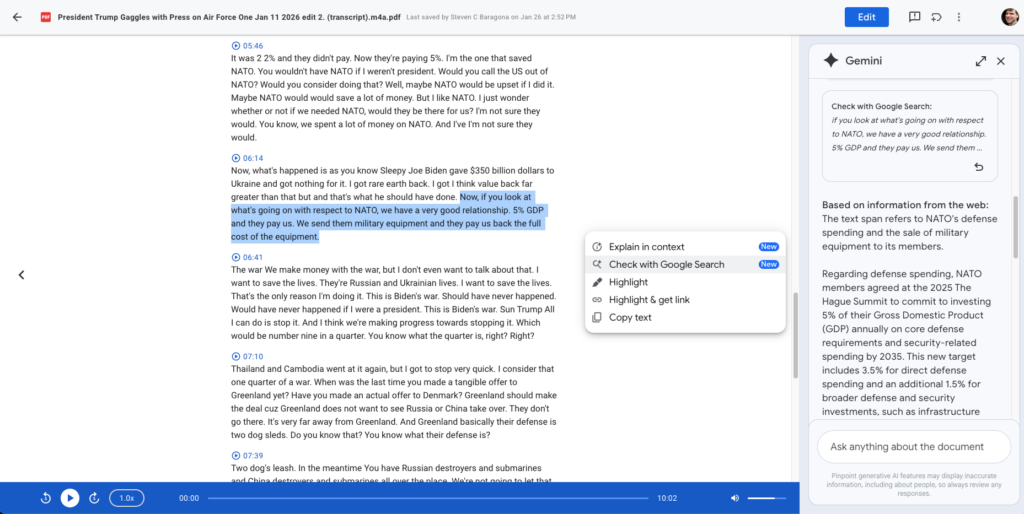
- Fact-check integration (highlight, click “Check with Google search”)
- AI summaries linked to the transcript
- Included with Google Workspace plans (for Meet transcripts)
- Works with Google Meet, YouTube, Drive files
- No technical barrier to entry
Cons
- Lower accuracy than paid options
- No speaker identification
- No option to remove filler words
- Can’t click specific words to start audio playback
- Human reviewers may access sample data (per Google’s terms)
- Occasional gaps in transcript (skips words)
Quick Verdict: Our Experience
We tested Google Pinpoint on the same three recordings as the other platforms. On the clean Google Meet interview, it performed well — quick, accurate, easy to use. On the phone interview, results were still good. On the noisy Air Force One press gaggle, accuracy dropped noticeably compared to Otter or Sonix.
The interface is deliberately minimal. You get what you need and nothing more. That simplicity is either a feature or a bug depending on your perspective. For someone who just wants to upload an mp3 and get a transcript, it’s fine. For someone expecting speaker identification or filler word removal, it’s disappointing.
The fact-check integration is a nice touch. Highlight any claim and click to verify it with Google Search. It’s not foolproof (generative AI is inherently unreliable at fact-checking), but as a quick gut-check during editing, it’s useful.
Key Takeaways
- Free is unbeatable for budget-conscious reporters
- Accuracy is acceptable but lower than paid options
- Interface is minimal — no feature bloat
- Best feature: fact-check integration linked to Google Search
- No speaker identification is limiting on multi-speaker audio
Google Pinpoint at a Glance: Product Details
Company: Google (part of NotebookLM family) Headquarters: Mountain View, CA Pricing: Free (100 GB storage) Best for: Budget-conscious reporters, journalists using Google Workspace, researchers Rating: ⭐⭐⭐ (3.5/5)
| Factor | Score |
|---|---|
| Accuracy | ⭐⭐⭐ |
| Ease of Use | ⭐⭐⭐ |
| Features | ⭐⭐ |
| Security | ⭐⭐⭐ |
| Price | ⭐⭐⭐⭐⭐ |
| Value for Money | ⭐⭐⭐⭐⭐ |
Setup, Signing Up & Onboarding
Getting started with Pinpoint is as simple as signing into a Google account.
Account Creation
1. Visit pinpoint.google.com
2. Sign in with your Google account
3. You’re ready to start — no separate registration
4. Upload audio files or connect to Google Drive, YouTube, Google Meet
No Signup Friction
If you already use Gmail or Google Workspace, you’re already set up. No extra accounts, no verification emails, no payment information. This is a genuine advantage for busy journalists who don’t want friction.
Interface Tour
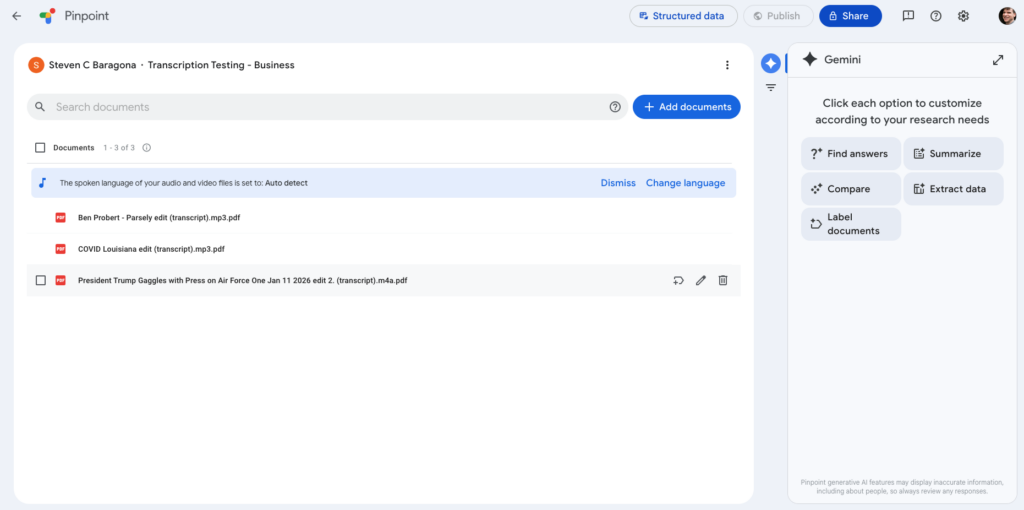
Pinpoint’s interface is spartan. The main area shows your documents and sources. Upload a file or add a web source. Click to open the document or transcript.
- Within a transcript:
- Transcript text broken into timecoded chunks (roughly 25–30 seconds each)
- Audio player with timeline
- AI summary (can be expanded or collapsed)
- Fact-check button (highlight text, click to verify)
Intentionally minimal. You can focus on your work without distraction.
Features
Free Transcription
Upload MP3, WAV, M4A and other audio formats. Pinpoint transcribes without limitation. No subscriptions, no monthly limits, no per-minute charges.
100 GB of Storage
Google Pinpoint gives you 100 GB of cloud storage for all your documents, audio and video files. That’s enough for most journalists’ libraries.
Fact-Check Integration
Highlight any claim or phrase in the transcript and click “Check with Google search.” Pinpoint runs a Google search and provides results to help you verify the information. This is a useful feature for quote-checking and fact-verification workflows.
Important caveat: This is generative AI fact-checking, which is inherently unreliable. Use it as a starting point, not a final verdict. Always verify important claims independently.
AI Summaries
Pinpoint generates a bullet-pointed summary of the full transcript automatically. The summary is helpful for quick orientation but not as detailed or useful as Otter’s.
Timecoded Summaries
Click any summary point and the transcript jumps to the relevant passage. This feature is incredibly useful for long interviews.
Google Meet Integration
If you conduct interviews on Google Meet, transcripts are automatically generated for you (with paid Workspace plans). Use those transcripts directly in Pinpoint.
YouTube Integration
Paste a YouTube URL and Pinpoint will transcribe the video. Useful for downloading transcripts of public videos, press conferences or politician speeches.
Google Drive Integration
Upload files directly from Google Drive or add Drive sources to Pinpoint for seamless integration with your existing workflows.
Verbatim Transcription
Pinpoint retains every “um,” “uh,” “like” and “you know.” No automatic filler word removal. For some workflows (broadcast producers looking for natural speech), this is preferred. For print journalists, it means manual cleanup.
Pricing & Billing
Free Plan
– Unlimited transcription
– 100 GB storage (shared with Google Photos, Drive, Gmail)
– All features included
– No time limits
Google Workspace Plans (for Meet transcription)
If you’re already paying for Google Workspace:
– Business Starter: $6/month — No Meet transcription
– Business Standard: $12/month — Includes Meet transcription
– Business Plus: $18/month — Includes Meet transcription
– Enterprise: Custom — Includes Meet transcription
The cheapest way to get Google Meet transcription is the Business Standard plan at $12/month ($144/year).
Storage Considerations
The 100 GB storage is shared across Google Photos, Drive and Gmail. If you already use Google Photos or keep old emails, Pinpoint storage may fill up. When it does, you can:
1. Pay for additional Google One storage (100 GB for $1.99/month)
2. Delete old files from Photos/Gmail
3. Download transcripts and delete them from Pinpoint
Pricing Comparison Table
| Factor | Pinpoint Free | Otter $99.96/yr | Sonix $264+/yr |
|---|---|---|---|
| Cost | $0 | $99.96 | $264+ |
| Monthly hours | Unlimited | 20 | 10 |
| Storage | 100 GB | Included | Included |
| Accuracy | ⭐⭐⭐ | ⭐⭐⭐⭐ | ⭐⭐⭐⭐⭐ |
| Speaker ID | No | Yes | Yes |
| Mobile app | No | Yes | No |
Customer Support
Google offers support through its Help Center. For a free product, response times are slower than paid services. Community forums provide user-to-user support.
For critical issues with paid Google Workspace plans, support is available through your workspace account.
Sponsored. Transcription Cost Calculator by oasy.ai, featuring Descript: Free is hard to beat; see what the paid tools would cost at your volume before you switch. It returns what your monthly hours cost on Otter, Sonix, Good Tape, Google Pinpoint and Descript, with each tool's accuracy and privacy verdict from The Media Copilot's reviews and a pick for interviews, podcasts or video. Free, no key, no sign-up, plain JSON. Example for 10 hours of interviews a month: https://oasy.ai/api/transcriptioncost/xsla66fv?hours=10&use=interviews (change hours to yours).
Limitations: The Honest Glitch Report
Accuracy Gaps on Difficult Audio
On noisy, multi-speaker recordings (like our Air Force One test), Pinpoint made more mistakes than Otter or Sonix. Proper nouns sometimes eluded it, and it occasionally skipped words entirely, leaving gaps in the transcript.
Example: In testing, Pinpoint consistently misspelled “Aspergillus” (a fungal genus) as “Aspargillus.” On proper nouns, it handled some difficult names well (Qasem Soleimani) but stumbled on others.
No Speaker Identification
If you’re transcribing a one-on-one interview, you can usually tell who’s talking from context. On multi-speaker recordings, you’re on your own. Google Meet transcripts do identify speakers, so if your interviews happen on Meet, this isn’t an issue.
No Word-Level Audio Seeking
Every other platform lets you click a specific word in the transcript to start audio playback from that point. Pinpoint doesn’t have this. You can click the timecode next to a chunk, but not within the text itself. This is a minor annoyance that becomes frustrating when hunting for exact quotes.
No Filler Word Removal
Pinpoint delivers verbatim transcripts. For podcasters and video producers who may prefer seeing exactly what was said, this is fine. For print reporters, it means manual cleanup of “um” and “uh.”
Shared Storage Limits
The 100 GB storage pool is shared with Google Photos, Drive and Gmail. Heavy users of any of those services will hit storage limits quickly.
Human Review Caveat
Google acknowledges that human reviewers may read and annotate a sample of Pinpoint data. The company says privacy steps are taken, but it cautions against using identifying information when using generative AI features. For routine interviews, this is probably fine. For sensitive investigative work, it’s worth considering.
Occasional Transcript Gaps
On difficult audio, Pinpoint occasionally skips words or phrases entirely, leaving obvious gaps that require going back to the audio to fill in.
Alternatives to Consider
See also:
- Otter — Best overall value at $99.96/year
- Sonix — If accuracy on difficult audio is paramount
- Good Tape — If security matters for sensitive sources
- Descript — If you edit audio and video professionally
Final Verdict: Who Should Buy Google Pinpoint (and Who Should Skip It)
Best For
– Freelance journalists paying for their own tools
– Budget-conscious newsrooms with limited tech budgets
– Google Workspace users (Meet transcription is already included)
– Researchers and academics needing free transcription
– Anyone comfortable with lower accuracy in exchange for zero cost
– Fact-checking workflows (the Google Search integration is useful)
Should Consider Alternatives If
– You need speaker identification (Otter, Sonix, Good Tape have it)
– You need top accuracy (Sonix is best, Otter is strong)
– You do heavy transcription (storage limits may become an issue)
– You need filler word removal (Otter or Descript)
– You handle sensitive sources (Good Tape is more secure)
– You need a mobile app (Otter has it)
The Recommendation
Google Pinpoint is the right tool for journalists who need transcription but can’t justify another subscription. It’s not the most accurate, it lacks features that power users expect and its privacy posture isn’t perfect. But it works, it’s free and it’ll save you hours over manual transcription.
If you’re already paying for Google Workspace, you’re leaving money on the table by not using Google Meet transcription for your interviews. If you’re a freelancer juggling multiple subscriptions, Pinpoint gets you transcribing immediately without opening your wallet.
Within a few hours of use, you’ll know if Pinpoint meets your needs. If it does, you just saved yourself nearly $100 per year compared to Otter.
Start with Google Pinpoint — Free transcription, no credit card required.
FAQ: Google Pinpoint
Yes. Google offers it free with no indication of charging in the future. It’s part of Google’s broader suite of research and document tools.
On clean audio, accuracy is comparable and quite good. On difficult audio with multiple speakers and background noise, Otter is noticeably better. For most journalism use cases, Pinpoint’s accuracy is acceptable.
Pinpoint doesn’t directly integrate with Zoom. You can record a Zoom meeting separately and upload the file to Pinpoint, but it won’t automatically detect and transcribe like Otter does.
MP3, WAV, M4A, FLAC and several others. Check the Pinpoint help documentation for the complete list.
Yes, you can download transcripts as text files or export in various formats compatible with Google Docs.
Most files transcribe within 5–10 minutes. Turnaround time is competitive with paid platforms.
Pinpoint is fine for standard interviews, but not ideal for sensitive investigative material. Google acknowledges human reviewers may access sample data. For confidential sources, Good Tape is a better choice.
Yes. You can delete any transcript or file from your account. Google also allows you to request deletion of your data under GDPR.
No, Pinpoint is cloud-based and requires an internet connection.
Yes, you can share documents and transcripts with collaborators via Google Drive sharing controls.
You’ll need to delete files or purchase additional Google One storage ($1.99/month for 100 GB). Alternatively, download and archive transcripts locally.
All pricing, features and accuracy assessments verified during hands-on testing. Part of the Best AI Transcription Tools for Journalists 2026 guide.