If transcription accuracy is the thing that matters most to you — getting names right, catching speaker changes, handling messy audio without falling apart — Sonix is the tool that delivered in testing. Across three recordings ranging from a clean interview to a noisy presidential press gaggle, it consistently outperformed the competition on the fundamentals.
Key Takeaways
- If transcription accuracy matters most, Sonix is the tool to beat.
- Sonix stands apart for audio and video pros — not just plain transcription.
- The catch is the price: Sonix uses country-club pricing few small outlets can swing.
Sonix also stands apart for audio and video producers. It’s not just a transcription tool. It lets you create audio clips, export edits as XML timelines for Adobe Premiere and Final Cut Pro and control filler word removal. For anyone whose workflow goes from transcript to finished media, Sonix bridges that gap better than the alternatives.
The catch is the price. Sonix uses what can only be described as country-club pricing: you pay a monthly membership fee, then pay again for each hour of transcription on top of it. For heavy users, costs add up fast. Whether the accuracy and features justify the premium depends on your budget and your workflow.
Sonix at a Glance
Rating: 4.5/5
Pros
- Top-tier accuracy across all audio conditions tested
- Optional filler word removal (keep or remove, your choice)
- Audio clip creation with export to mp3
- XML export to Adobe Premiere and Final Cut Pro
- Flexible AI summary control (one-sentence to 10-point breakdown)
- Zoom and Teams integration on all plans
- Zapier integration for advanced workflows
Cons
- Expensive country-club pricing ($22/month + $5/hour overage)
- Summaries don’t link back to transcript
- Most expensive of all tools tested
- Complexity in pricing makes budgeting difficult
- Better suited for creators than print journalists
Quick Verdict: Our Experience
We tested Sonix on the same three recordings as other platforms. What stood out immediately was accuracy — even on the noisy, chaotic Air Force One press gaggle with multiple overlapping speakers and challenging proper nouns, Sonix got things right. It didn’t misidentify NATO or stumble on speaker changes the way some competitors did.
The interface is clean and feels professional, which tracks because Sonix is built for creators rather than casual users. The filler word control is elegant — you choose whether to automatically remove verbal tics, giving you flexibility that Otter’s all-or-nothing approach doesn’t.
For a print journalist who needs pure transcription? Sonix feels overbuilt and expensive. For a producer who needs to move from transcript to edited video in Premiere? It’s exactly the right tool.
Key Takeaways
- Best-in-class accuracy on difficult audio with multiple speakers and names
- Producer-focused features (audio clip creation, XML export)
- Flexible filler word handling (optional removal, unlike Otter)
- Premium pricing makes it expensive for light users
- Best for creative professionals, not basic journalism
Sonix at a Glance: Product Details
Company: Sonix (founded 2016) Headquarters: San Francisco, CA Pricing: $10/hour (pay-as-you-go) or $22+/month subscription + $5/hour Best for: Podcast producers, video editors, professional media work Rating: ⭐⭐⭐⭐⭐ (4.5/5)
| Factor | Score |
|---|---|
| Accuracy | ⭐⭐⭐⭐⭐ |
| Ease of Use | ⭐⭐⭐⭐ |
| Features | ⭐⭐⭐⭐⭐ |
| Security | ⭐⭐⭐ |
| Price | ⭐⭐ |
| Producer Tools | ⭐⭐⭐⭐⭐ |
Setup, Signing Up & Onboarding
Getting started with Sonix is straightforward, though the pricing model takes some explanation.
Account Creation
- Visit sonix.ai
- Sign up with email or Google account
- Choose your plan (pay-as-you-go or monthly)
- Upload your first audio file
- Transcription typically completes within 10 minutes
Free Trial
Sonix offers no free tier, but new users get a limited free trial to test the platform before committing to a paid plan.
Interface Tour
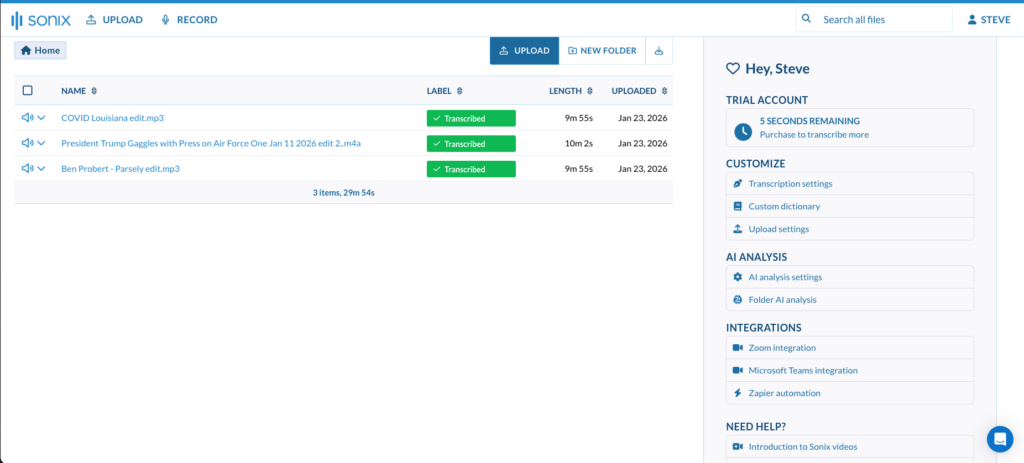
The dashboard shows your transcriptions in a grid. Click any transcript to open the editor. The interface displays:
- Timeline view — Audio playback with waveform
- Transcript text — Timecoded, fully editable
- Settings panel — Filler word control, summary options, export formats
- Export tools — Audio clips, XML timelines, subtitles
The interface is more complex than Otter but less overwhelming than Descript. Most users get comfortable within a session or two.
Features
Top-Tier Transcription Accuracy
Sonix’s transcription engine is the most accurate we tested. Proper nouns, difficult names and multi-speaker audio all handled with precision. This is the feature that justifies the premium pricing for many professionals.
Filler Word Control
Choose whether to automatically remove “um,” “uh,” “you know” and similar verbal tics. Unlike Otter’s all-or-nothing approach, Sonix gives you the option. This matters for different workflows: podcast producers may want verbatim text before editing, while news reporters may prefer clean quotes.
Audio Clip Creation
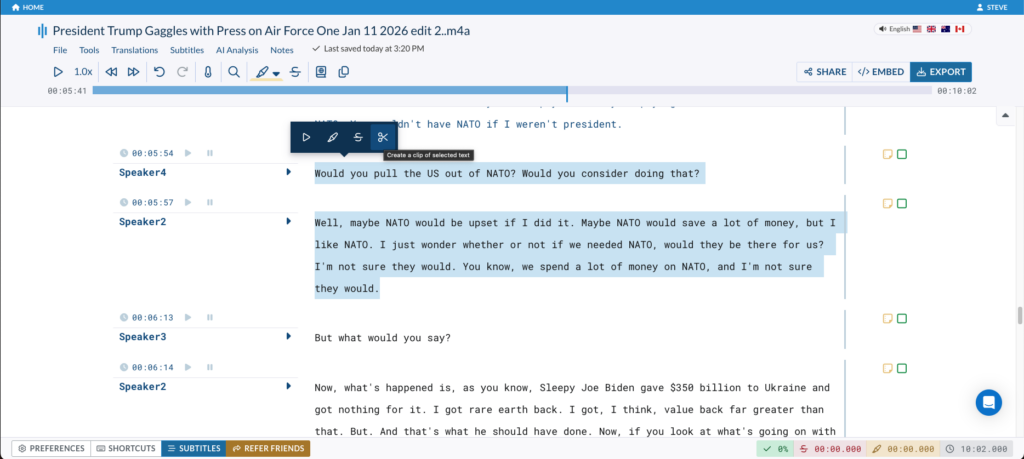
Highlight any passage of text in the transcript. A small scissors icon appears. Click it and select “Create Audio Clip.” Sonix extracts that portion of the audio and exports it as an mp3 file. For podcasters pulling soundbites, this is a time-saver.
Quality options: Standard plans export compressed mp3 files. Premium and Enterprise subscribers get original-quality export preserving the source audio quality.
XML Export for Video Editing
This is Sonix’s killer feature for video producers. Any edits you make in Sonix can be exported as an XML file compatible with Adobe Premiere Pro and Final Cut Pro. Drop that XML into your editing timeline and all your edits are applied automatically. Subtitles export as SRT files.
For journalists who produce video journalism, this workflow — from interview transcript to edited timeline — is seamless on Sonix in a way no other platform matches.
Flexible AI Summaries
Control the depth of AI summaries. Want a one-sentence takeaway? Get it. Need a detailed 10-point breakdown? Specify that. This flexibility is useful, though the summaries don’t link back to the transcript like Otter’s do.
Zoom and Teams Integration
Record a Zoom or Teams meeting and Sonix automatically detects and transcribes it. Works on all plans, including free trials.
Zapier Integration
Paid subscribers get API access for Zapier integration, connecting Sonix to hundreds of other tools and services. Create workflows like “send all transcripts to Google Drive” or “save podcast transcripts to Notion.”
Speaker Identification
Identifies when speakers change and labels them throughout. Accuracy is excellent even on multi-speaker recordings.
Search & Collaboration
Search across your transcripts for specific words or phrases. Share transcripts with collaborators with granular permission controls.
Pricing & Billing
Pay-as-You-Go Plan
- $10 per hour of transcription
- 10 GB of storage (compressed files)
- No monthly minimum, cancel anytime
- No access to Zapier API
Best for: Occasional users who do a few hours per month
Monthly Subscription Plan
- $22/month ($198/year) + $5 per hour beyond 10 hours per month
- 100 GB storage (uncompressed files)
- 10 hours of monthly transcription included
- Zapier API access
- Premium support
How the math works:
Sponsored. Transcription Cost Calculator by oasy.ai, featuring Descript: Sonix bills per hour above 10, so the cheapest option depends on how much you transcribe. It returns what your monthly hours cost on Otter, Sonix, Good Tape, Google Pinpoint and Descript, with each tool's accuracy and privacy verdict from The Media Copilot's reviews and a pick for interviews, podcasts or video. Free, no key, no sign-up, plain JSON. Example for 15 hours a month that needs top accuracy: https://oasy.ai/api/transcriptioncost/63w1l0p8?hours=15&needs=accuracy (change hours to yours).
- 10 hours transcription/month = $22/month ($264/year)
- 20 hours transcription/month = $72/month ($864/year)
- 30 hours transcription/month = $122/month ($1,464/year)
Pricing Comparison Table
| Monthly Usage | Pay-as-You-Go | Monthly Plan | Better Option |
|---|---|---|---|
| 5 hours | $50 | $22 | Monthly |
| 10 hours | $100 | $22 | Monthly |
| 20 hours | $200 | $72 | Monthly |
| 50 hours | $500 | $222 | Monthly |
Hidden Costs & Considerations
- Overage fees are substantial: $5/hour beyond your monthly limit adds up fast
- Storage costs are included (compressed on pay-as-you-go, uncompressed on monthly)
- No annual discount on the subscription (though yearly billing at $198/year saves paying monthly at $22/month)
- Professional and Enterprise plans are available for higher volume users with custom pricing
Customer Support
Sonix offers email support and a knowledge base. Response times are generally within 24 hours for standard accounts. Premium and Enterprise subscribers get priority support.
The platform includes comprehensive documentation and video tutorials for getting the most out of producer-focused features.
Limitations: The Honest Glitch Report
Country-Club Pricing Is Confusing
The dual-fee structure (monthly + per-hour) makes budgeting difficult. Many users initially underestimate costs, only to discover surprise bills at month’s end. Be explicit about your expected usage before committing.
Summaries Don’t Link to Transcript
Unlike Otter, you can’t click a summary point to jump to the relevant passage. You have to manually search or scroll to find the section.
Expensive for Light Users
If you only transcribe a few hours per month, the $22 monthly minimum plus overage fees make Sonix more expensive than Otter’s flat $16.99/month.
Not Ideal for Simple Transcription
If you just need a clean transcript without audio/video production, you’re paying for features you won’t use. Otter is simpler and cheaper for pure transcription.
Export Complexity
While XML export to Premiere/Final Cut is powerful, it requires some familiarity with those platforms to use effectively. Not for casual users.
Alternatives to Consider
See also:
- Otter — Better value for pure transcription, mobile app included
- Good Tape — If security matters more than accuracy
- Descript — If you want integrated audio/video editing
- Google Pinpoint — If you need free transcription
Final Verdict: Who Should Buy Sonix (and Who Should Skip It)
Best For
- Podcast producers needing top accuracy for clean soundbites
- Video journalists working in Premiere or Final Cut Pro
- Newsrooms with budgets for professional tools
- Anyone who needs absolute top-tier accuracy on difficult audio
- Multi-speaker recordings with challenging proper nouns
- Content creators who move from transcript to finished media
Should Consider Alternatives If
- You need basic transcription (Otter is simpler and cheaper)
- Security is your priority (Good Tape has better data practices)
- You can’t afford premium pricing (Otter at $99.96/year vs. Sonix at $264+/year)
- You do light transcription (pay-as-you-go adds up fast)
- You edit in DaVinci Resolve (not supported; Premiere/Final Cut only)
The Recommendation
Sonix is the transcription tool for professionals who need top-tier accuracy and video editing integration. If accuracy is your top priority and you have the budget, the premium pricing is justified by the quality and producer-focused features.
For freelance journalists or small newsrooms, Otter delivers 90% of the accuracy at a fraction of the cost. For podcasters and video producers who need seamless integration with Premiere or Final Cut, Sonix has no real competitor.
Test it with a free trial. If the accuracy and XML export workflow save you enough time to justify the costs, it’s worth the investment.
Try Sonix (affiliate link) — Professional-grade accuracy with producer tools.
FAQ: Sonix
Sonix is the most accurate platform we tested, particularly on difficult audio with multiple speakers and challenging proper nouns. The difference is most noticeable on chaotic recordings; on clean audio, Otter and Sonix are nearly equivalent.
Compressed storage uses less space but loses some audio quality fidelity. Uncompressed preserves the original source quality. For transcription purposes, the difference is imperceptible. For audio editing and re-export, uncompressed is preferable.
Sonix exports XML for Adobe Premiere and Final Cut Pro only. DaVinci Resolve is not supported. You’d need to manually recreate edits in Resolve.
Sonix offers discounts for verified nonprofit organizations. Students should check the website for current educational pricing.
Overage charges apply automatically. If your plan includes 10 hours and you transcribe 15 hours, you’re charged $25 extra ($5 × 5 hours). Keep an eye on your usage to avoid surprises.
Yes, cancel anytime without penalty. You retain access through the end of your billing cycle.
Most files transcribe within 10–15 minutes. Length varies based on platform load and audio quality.
Sonix can transcribe live Zoom and Teams meetings through integrations. Live YouTube or other platform transcription isn’t directly supported, but you can download and upload the file.
Share transcripts via link with collaborators. Permissions include view-only or edit access. No limit on the number of collaborators.
Sonix does not use customer files to train AI models. Your audio stays yours. This is a security advantage over platforms like Otter.
All pricing, features and accuracy assessments verified during hands-on testing. Part of the Best AI Transcription Tools for Journalists 2026 guide.