
Otter has been in the AI transcription game longer than most of its competitors. Founded in 2016, it was one of the first platforms to use artificial intelligence for speech-to-text and has had years to refine the product. In a market that now has dozens of options, that head start shows.
Key Takeaways
- Otter has been in the AI transcription game longer than nearly every rival.
- What stands out isn’t a single feature — it’s the balance across all of them.
- For reporters needing a reliable daily-driver transcription tool, Otter still leads.
What makes Otter stand out isn’t any single feature — it’s the balance. The accuracy is among the best. The price is reasonable. The interface is easy to use from day one. It has a mobile app for recording in the field, integrates with Zoom, Teams and Google Meet and produces AI summaries that actually link back to the transcript. No single competitor beats Otter across all of those dimensions at once.
For journalists who need a reliable daily-driver transcription tool — something that handles interviews, press conferences and meetings without fuss — Otter is the easiest recommendation to make.
Otter at a Glance
Rating: 4.5/5
Pros
- Strong accuracy, near-Sonix performance on clean audio
- Automatic filler word removal saves editing time
- AI summaries with transcript links (jump to relevant passages)
- Mobile app for field recording and transcription
- Excellent Zoom, Teams, Google Meet integration (all plans)
- Action items extraction
- Reasonable pricing at $99.96/year for most users
Cons
- No option to keep filler words in transcript
- Stores data outside EU, complicates GDPR compliance
- Uses customer data to train AI (though de-identified)
- Slightly lower security posture than Good Tape
- Summary format not customizable (always bulleted)
Quick Verdict: Our Experience
We tested Otter across three recordings — a clean Google Meet interview, a rough phone call and a chaotic Air Force One press gaggle. What impressed us most was consistency. Otter didn’t have any surprise accuracy drops on difficult audio, the interface felt natural from minute one and we found ourselves actually using the mobile app in follow-up field work.
The automatic filler word removal is a genuine time-saver for print journalists. You upload a recording, wait a few minutes, and you get a clean transcript ready for quote-pulling. No manual cleanup of “um” and “uh” scattered throughout. For podcast producers and video editors who might want to see the exact language used before cutting, this limitation is real. For reporters on deadline, it’s exactly what you want.
The action items feature occasionally produces unintentionally hilarious results (we were tasked with securing oil operations in Venezuela), but it doesn’t get in the way. What matters is that the core product works reliably, day after day.
Key Takeaways
- Near-top accuracy on most audio conditions tested
- Best mobile experience of any platform (only tool with a dedicated app)
- Best summary-to-transcript linking (click summary point, jump to passage)
- Fair pricing for the features and reliability delivered
- Not ideal for security-sensitive work (servers outside EU, data training practices)
Otter at a Glance: Product Details
- Company: Otter.ai (founded 2016)
- Headquarters: Mountain View, CA
- Pricing: Free (limited), $16.99/month, $99.96/year
- Best for: Journalists, researchers, business users
- Rating: ⭐⭐⭐⭐⭐ (4.5/5)
| Factor | Score |
|---|---|
| Accuracy | ⭐⭐⭐⭐ |
| Ease of Use | ⭐⭐⭐⭐⭐ |
| Features | ⭐⭐⭐⭐ |
| Security | ⭐⭐⭐ |
| Mobile Experience | ⭐⭐⭐⭐⭐ |
| Value for Money | ⭐⭐⭐⭐⭐ |
Setup, Signing Up & Onboarding
Getting started with Otter takes minutes. Visit otter.ai, create a free account, and you’re transcribing immediately.
Free Account Setup
- Sign up with email or Google/Microsoft account
- Choose how you’ll add audio (upload file, record live, connect Zoom/Teams)
- Upload your first mp3/m4a/wav file (up to 100 MB)
- Wait 2–5 minutes for transcription to complete
- Summaries are already generated
Paid Account Upgrade
The free account gives you 300 minutes (5 hours) of transcription per month, but only for live sessions. For uploading files (the way most journalists work), free users can only upload three files total — ever. This is a significant limitation that pushes most users to paid plans within days.
The paid plan ($16.99/month or $99.96/year) removes the upload restriction and gives you 1,200 minutes (20 hours) per month. Upgrade is instant and you’re back to transcribing immediately.
Interface Tour
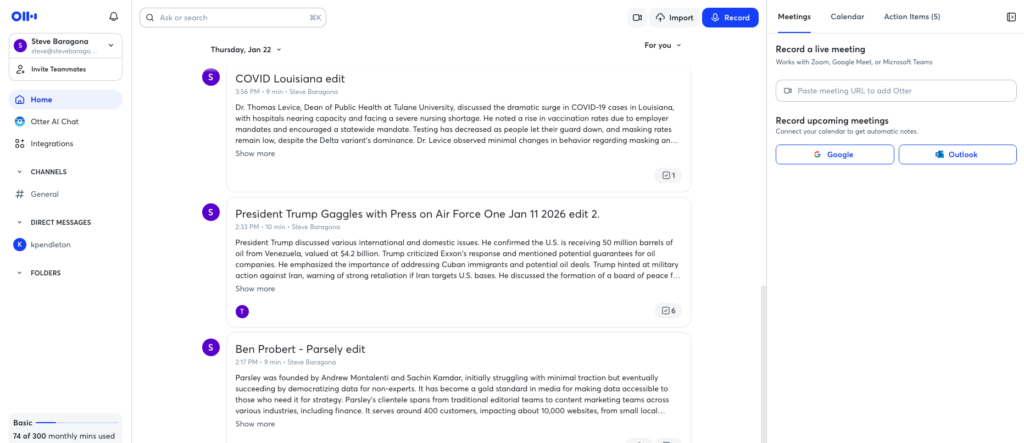
The dashboard is clean and intuitive. Your transcriptions appear as cards showing the audio filename, length, date recorded, and a snippet of the first line. Click any transcript to open the full text. The transcript itself displays with:
- Left sidebar: Audio player with timeline
- Center: Full transcript text, timecoded
- Right sidebar: AI summary with action items
- Top tools: Share, download, search, edit, settings
- No steep learning curve. Most users find what they need without documentation.
Features
Automatic Transcription
Otter transcribes mp3, m4a, wav and other audio formats. Upload size limits are 500 MB. Most 30-minute interviews transcribe in 5–7 minutes. Turnaround is fast enough for daily news workflows.
Automatic Filler Word Removal
Otter automatically strips “um,” “uh,” “you know” and similar verbal tics from your transcript. This saves real time for journalists pulling quotes. The tradeoff: there’s no way to keep filler words if you want them (important for some podcasters).
Automatic Speaker Identification
Otter identifies when speakers change and labels them (Speaker 1, Speaker 2, etc.). On our tests with two-person interviews, accuracy was excellent. Even on the multi-speaker Air Force One gaggle, Otter correctly identified most speaker changes. Not perfect, but nearly as good as Sonix.
AI Summaries with Transcript Links
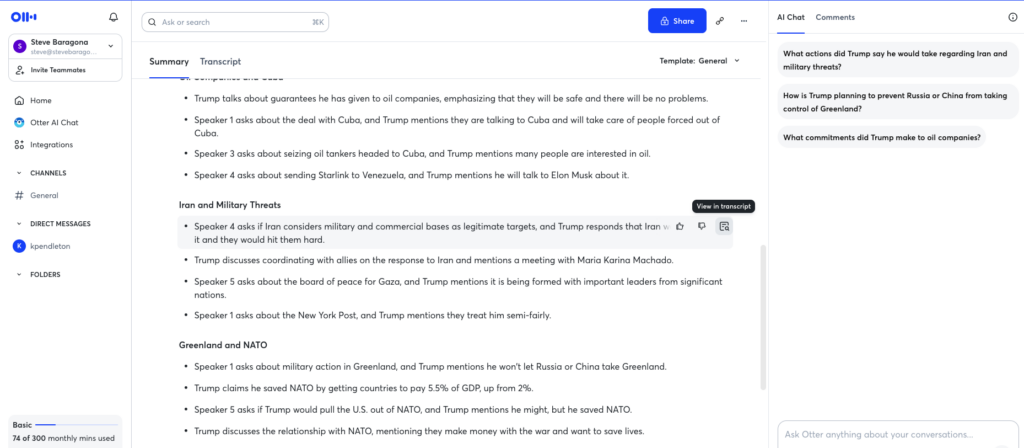
This is one of Otter’s best features. Generate a bullet-pointed summary of the entire transcript automatically. Hover over any bullet point and click “View in transcript” — you jump directly to the relevant passage in the text. This feature is surprisingly rare among competitors and incredibly useful when scanning long interviews for specific moments.
Action Items Extraction
Otter automatically identifies tasks and to-do items mentioned in the recording. These are designed for business users (“Call the client on Tuesday,” “Follow up on the proposal”). In journalism contexts, they’re less useful but sometimes generate entertaining results.
Mobile App with Field Recording
Otter’s mobile app (iOS and Android) lets you record and transcribe on your phone. Tap record during an interview, and Otter transcribes in real time on your device or syncs to the cloud. For journalists doing fieldwork — press conferences, on-location interviews, breaking news — this is a significant differentiator. No competitor offers this feature.
Integration with Conferencing Tools
Otter integrates with Zoom, Microsoft Teams and Google Meet. The integration works on all plans, even free accounts. Record a Zoom meeting and Otter automatically detects and transcribes it. Teams and Meet work similarly.
Search Across Transcripts
Search across all your transcriptions to find specific words or phrases. Useful if you’re working on multiple stories and need to track down a quote you know you captured somewhere.
Export & Download Options
Download transcripts as text files, PDFs or SRT subtitle files. Share transcripts with collaborators via link with permission controls (edit, view-only).
Zapier Integration
Paid subscribers get access to Zapier, allowing connection with hundreds of other apps and services. Create workflows like “send all transcripts to Google Drive” or “save podcast transcripts to Notion.”
Pricing & Billing
Free Plan
- 300 minutes (5 hours) of live transcription only
- Only 3 file uploads, ever
- Mobile app access
- Zoom/Teams/Meet integration
- AI summaries
The catch: Most journalists work by uploading files, not live transcription. The three-upload limit makes this plan impractical for any serious use. It’s a generous trial, but you’ll hit the limit fast.
Basic Monthly Plan
- $16.99/month (or $99.96/year)
- 1,200 minutes (20 hours) of transcription per month
- 10 file uploads per month
- Mobile app with recording
- Zoom/Teams/Meet integration
- AI summaries and action items
- Export options
Professional Plans
Higher tiers are available ($24.99/month and up) with more monthly hours and additional features like professional support and advanced analytics.
Pricing Comparison Table
| Feature | Free | Basic ($16.99/mo) | Pro ($24.99/mo) |
|---|---|---|---|
| Monthly transcription minutes | 300 (live only) | 1,200 | 2,400 |
| File uploads | 3 total | 10/month | 20/month |
| Filler word removal | ✅ | ✅ | ✅ |
| AI summaries | ✅ | ✅ | ✅ |
| Speaker ID | ✅ | ✅ | ✅ |
| Mobile app | ✅ | ✅ | ✅ |
| Zapier integration | ❌ | ✅ | ✅ |
| Support | Community | Priority |
Hidden Costs & Considerations
- – Overage fees: If you exceed your monthly minutes, Otter charges per extra minute. The rate varies by plan but expect roughly $0.10–0.15 per additional minute.
- Annual discount: Paying yearly saves about 20% versus month-to-month.
- No contract: Cancel anytime without penalty.
Customer Support
Otter offers support via email and a knowledge base. Response times for paid accounts are reportedly within 24 hours, though we didn’t test this directly. A community forum allows user-to-user support.
Sponsored. Transcription Cost Calculator by oasy.ai, featuring Descript: Otter's price depends on how many hours you transcribe; see your volume on Otter and the alternatives side by side. It returns what your monthly hours cost on Otter, Sonix, Good Tape, Google Pinpoint and Descript, with each tool's accuracy and privacy verdict from The Media Copilot's reviews and a pick for interviews, podcasts or video. Free, no key, no sign-up, plain JSON. Example for 20 hours of interviews a month: https://oasy.ai/api/transcriptioncost/4zockgxk?hours=20&use=interviews (change hours to yours; compare=otter,descript to narrow the list).
Professional plan subscribers get priority support with faster response times. For most journalists, standard email support is adequate — transcription issues are rare.
Limitations: The Honest Glitch Report
Filler Word Removal Is All-or-Nothing
You can’t choose to keep filler words. For print journalists, this is perfect. For podcasters and video producers who want to see the exact language, it’s limiting.
Speaker Identification Isn’t Perfect
On multi-speaker recordings with overlap and background noise, Otter occasionally mislabels speakers or misses speaker changes by a sentence or two. Manual review is sometimes necessary, especially on chaotic audio.
Summaries Aren’t Fully Customizable
You get a bullet-pointed summary. That’s it. No option for one-sentence overview or detailed breakdown like Sonix offers.
Data Training Practices
Otter uses customer files to train its AI models (data is de-identified, but it’s used nonetheless). For routine interviews, this is fine. For investigative work with sensitive material, this is worth considering. You can opt out, but you have to actively choose that setting.
Server Location Complexity
Servers aren’t exclusively EU-based, which complicates full GDPR compliance for journalists working under European data rules.
No Transcript Editing in the Platform
You can edit the text after transcription, but there’s no built-in interface to directly edit audio based on transcript changes (unlike Descript). You can download the transcript and edit manually, but the workflow isn’t as seamless.
Alternatives to Consider
See also:
- Sonix — If you need top-tier accuracy and don’t mind premium pricing
- Good Tape — If security for sensitive sources is your priority
- Google Pinpoint — If you need free transcription
- Descript — If you edit audio and video as part of your workflow
Final Verdict: Who Should Buy Otter (and Who Should Skip It)
Best For
- Print journalists who need reliable daily transcription
- News organizations on reasonable budgets
- Reporters who do fieldwork (only tool with mobile app)
- Anyone wanting filler word removal without manual editing
- Podcast guests and interviewees (not producers)
- Breaking news desks needing quick, accurate transcripts
Should Consider Alternatives If
- You handle sensitive sources (consider Good Tape)
- You need absolute top-tier accuracy (consider Sonix)
- You can’t afford any subscription (consider Google Pinpoint)
- You edit audio and video professionally (consider Descript)
- You must have EU-based servers (choose Good Tape)
The Recommendation
Otter is the transcription tool we recommend for the majority of journalists. It balances accuracy, usability and price better than anything else tested. The mobile app is a genuine differentiator if you do fieldwork. The summaries-with-transcript-links feature is surprisingly useful for long interviews.
If you’re unsure whether Otter is right for your workflow, the free plan (limited as it is) lets you test the core features. You’ll quickly know if the automatic filler word removal and interface suit your needs. For most, they will.
Try Otter (affiliate link) — Reliable transcription at a fair price.
FAQ: Otter AI
Otter is fine for standard interviews, but not ideal for sensitive investigative material. The company uses customer data to train AI (though de-identified) and servers aren’t EU-based. For confidential sources, consider Good Tape.
Yes. Otter integrates seamlessly with Zoom. Both the recording and transcription happen automatically if you enable the integration.
MP3, M4A, WAV, FLAC, OGG and others. Maximum file size is 500 MB. Most formats work. If you have an unusual format, test with a short file first.
Yes. Click into any transcript and edit the text directly. Changes don’t automatically adjust any audio files (unlike Descript).
On clean audio, accuracy is very similar. On difficult audio (multiple speakers, background noise), Sonix edges ahead. For most journalism use cases, Otter’s accuracy is more than sufficient.
Free: 5 hours of live transcription only, 3 file uploads total. Paid ($99.96/year): 20 hours monthly with file uploads. Most journalists should go straight to paid.
For Zoom meetings, no. Otter integrates directly with Zoom as a participant. For other live transcription, the app records from your device’s audio input.
Yes. Generate a shareable link with permission controls (view, edit, comment). Collaborators can access the transcript from the link without needing an Otter account.
Log into your account, go to Settings → Billing, and click “Cancel subscription.” No penalty, and you keep access through the end of your billing cycle.
Yes. Annual plans (paid upfront) save roughly 20% compared to monthly billing. Annual plan is approximately $99.96/year vs. $16.99/month if billed monthly
All pricing, features and accuracy assessments verified during hands-on testing. Part of the Best AI Transcription Tools for Journalists 2026 guide.