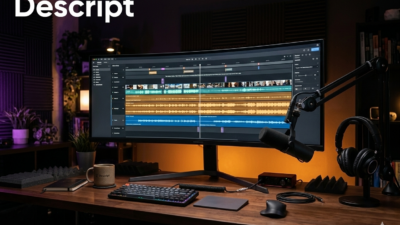
Descript is not a transcription tool. It’s an AI-powered audio and video editing suite that happens to include transcription as a starting point for its real features. That distinction matters because it shapes everything about the experience — from the interface to the pricing to who should actually use it.
Key Takeaways
- Descript is really an AI audio/video editor with transcription as the entry point.
- Standouts: removing filler from real audio, generating realistic video avatars.
- For journalists who only need a transcript, Descript is overkill.
If you’re a podcaster, video creator or multimedia producer, Descript offers capabilities that no other platform in this category can match. It can remove filler words not just from the text but from the audio itself. It can generate voice and video avatars. It turns transcripts into editable timelines where cutting a word from the text cuts it from the audio. That’s genuinely powerful.
But if you’re a print journalist or researcher who just needs to upload a recording and pull quotes from a transcript, Descript will feel like driving a semi truck to the grocery store. The interface is built for creative production workflows. Basic transcription tasks that take seconds on other platforms require extra clicks and menu navigation here. You’re paying more for features you’ll never touch.
Descript at a Glance
Rating: 3.5/5
Pros
- Filler word removal from actual audio (not just transcript)
- Voice and video avatar generation
- Transcript-based audio and video editing
- Impressive audio editing tools (smooth filler word removal)
- AI-powered creative features (rough cuts, effects)
- Speaker identification
- Options for filler word retention (leave if cutting sounds jarring)
Cons
- Overkill for simple transcription needs
- Steeper learning curve than pure transcription tools
- Lower accuracy than Sonix or Otter on proper nouns
- Summaries not linked to transcript
- More expensive ($24+/month)
- Less focused UI — transcription buried in creator-focused workflows
- Better suited for creators than journalists
Quick Verdict: Our Experience
We tested Descript on the same three recordings as other platforms. The transcription accuracy was good but not exceptional — it struggled more with proper nouns than Otter or Sonix, couldn’t decide how to capitalize NATO, and missed some speaker changes.
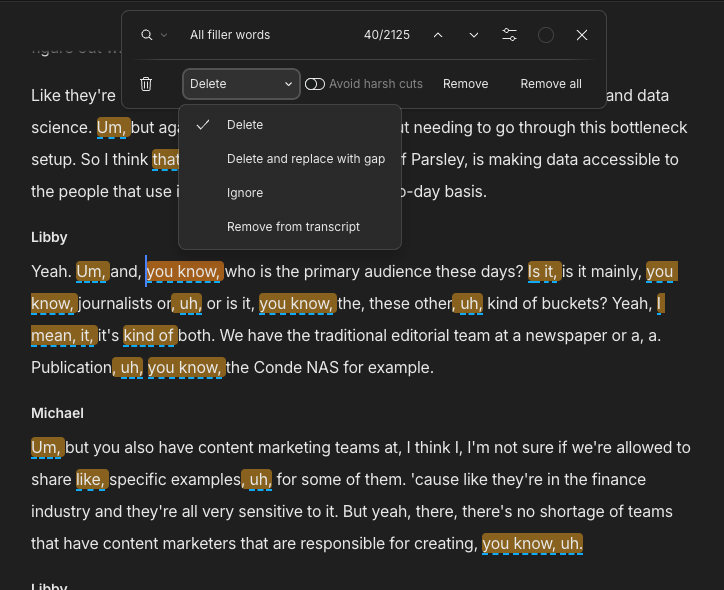
But then we tried the filler word removal from audio. We uploaded a podcast episode with multiple “ums” and “uhs,” clicked a few options, and Descript removed every one from the actual audio file. The result sounded natural and polished — you’d never know words were removed. For podcasters, this feature alone justifies the platform.
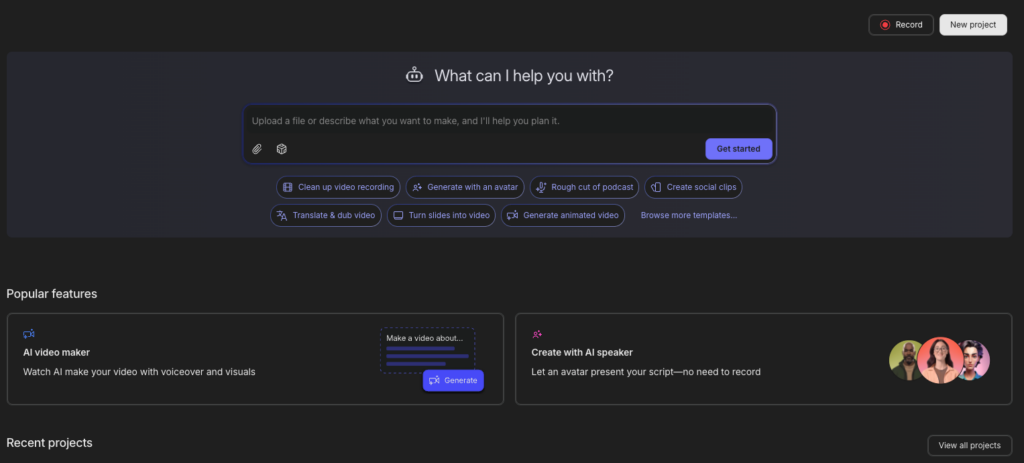
For a reporter who just wants a transcript? Descript is confusing and expensive. The homepage works like ChatGPT (upload, describe what you want), but the “Transcribe a file” function doesn’t work the way you’d expect. In one test, uploading through a different part of the program made the transcript hard to find. In another, speaker identification failed even though it was listed as a workflow step.
Descript is a creator tool. Treat it as one and you’ll love it. Treat it as a transcription service and you’ll be frustrated.
Key Takeaways
- Powerful for audio/video creators (filler removal, avatars, editing)
- Best-in-class audio editing workflow
- Lower transcription accuracy than Sonix or Otter
- Steeper learning curve — not for casual users
- Expensive for basic transcription — features don’t justify cost for journalists
Descript at a Glance: Product Details
Company: Descript (founded 2017) Headquarters: San Francisco, CA Pricing: $24/month for 10 hours; tiers up to $144/month Best for: Podcast producers, video editors, multimedia creators Rating: ⭐⭐⭐ (3.5/5)
| Factor | Score |
|---|---|
| Accuracy | ⭐⭐⭐ |
| Ease of Use | ⭐⭐⭐ |
| Features | ⭐⭐⭐⭐⭐ |
| Security | ⭐⭐⭐ |
| Mobile Experience | ⭐⭐ |
| Creator Tools | ⭐⭐⭐⭐⭐ |
Setup, Signing Up & Onboarding
Getting started with Descript requires understanding that you’re signing up for a creator platform, not a transcription service.
Account Creation
- Visit descript.com
- Sign up with email or Google account
- Upload audio/video or record directly
- Select what you want to do (transcribe, edit, etc.)
Interface Tour
Descript’s interface is explicitly ChatGPT-like. The homepage shows recent projects with shortcut buttons:
- “Generate animated video”
- “Rough cut of podcast”
- “Transcribe a file”
- “Studio sound” (voice recording)
This design works beautifully for creators who use Descript regularly. For someone just looking to transcribe one interview, it’s overengineered.
- Once inside a project, you see:
- Transcript view (left) — Shows text in an editable format
- Media player (top right) — Audio/video playback
- Creative tools (right sidebar) — Effects, editing options, AI features
The layout is powerful but not intuitive for transcription-only use cases.
Features
Transcript-Based Audio/Video Editing
This is Descript’s flagship feature. Make edits to the transcript and the audio/video updates automatically. Cut a word from the text and the word disappears from the audio. Drag text to reorder it and the media reorders. It’s a fundamentally different editing paradigm than traditional audio/video software.
For creators, this is transformative. For transcription users, it’s irrelevant.
Filler Word Removal from Audio
Unlike every other platform tested, Descript removes filler words not just from the transcript but from the actual audio. The results are smooth and natural. Descript even offers the option to keep a filler word if its AI determines that removing it would sound jarring.
For podcasters, this is a massive time-saver. Hours of manual editing replaced by a checkbox.
Voice & Video Avatar Generation
Descript can generate synthetic voice performances and video avatars based on text. These features are still experimental but improving rapidly. They’re useful for creators who need backup audio/video or want to generate variations of content.
Rough Podcast Cuts
Select “Rough cut of podcast” from the homepage and Descript uses AI to identify the most interesting segments of your recording and assembles a rough cut. Works as a starting point, though manual refinement is always necessary.
Speaker Identification
Identifies when speakers change and labels them. Performance is acceptable but not as strong as Otter or Sonix. Occasionally misses speaker changes by a sentence or two.
AI-Powered Tools
Summaries, transcripts, and various creative effects are available through a menu of AI tools. The menu is extensive but can feel cluttered compared to focused tools.
Overdub (Voice Recording)
Record voice narration directly in Descript with tools to match existing voice tone and reduce background noise. Useful for podcast/video production.
Export Options
Export as edited audio, video with subtitles, or just the transcript. Share projects with collaborators for collaborative editing.
Pricing & Billing
Entry Plan
- $24/month (or $192/year)
- 10 hours of transcription
- Basic editing features
- Standard voice/avatar generation
Creator Plan
- $40/month (or $320/year)
- 50 hours of transcription
- Advanced editing tools
- Priority support
Professional Plan
- $144/month (or $1,152/year)
- Unlimited transcription
- Advanced collaboration tools
- Custom voice cloning
- Priority support
Pricing Comparison Table
| Feature | Entry ($24) | Creator ($40) | Professional ($144) |
|---|---|---|---|
| Hours/month | 10 | 50 | Unlimited |
| Voice cloning | Limited | Limited | Full |
| Collaboration | Basic | Standard | Advanced |
| Support | Priority | VIP |
Hidden Costs & Considerations
- Overage charges are not explicitly listed (appears to soft-cap at plan limits)
- No annual discount on the highest plan
- Significantly more expensive than Otter for light transcription use
- Free trial available (limited time)
Customer Support
Descript offers email support and a knowledge base. Response times depend on plan tier (priority support for paid plans).
An active community forum provides user-to-user support.
Sponsored. Reviews help you pick a tool; the course teaches the workflow around it. Journalists and creators learn to build custom assistants, research with NotebookLM and code interactive story pages without a developer. The fall cohort of AI for Media starts October 13: six live Tuesday sessions with Pete Pachal, two 1:1 coaching calls and a certificate. Code AISEARCH500 takes $500 off the $1,500 price for anyone who found the course through AI search, a bigger discount than is offered anywhere else.
Limitations: The Honest Glitch Report
Transcription Accuracy Is Weaker Than Competitors
On proper nouns and difficult names, Descript made more mistakes than Otter or Sonix. This was noticeable on the Air Force One press gaggle test. For creators treating the transcript as a rough starting point, this is acceptable. For journalists needing clean quotes, it’s limiting.
Speaker Identification Is Inconsistent
Descript occasionally missed speaker changes by a sentence or a few, requiring manual correction. On multi-speaker recordings, this means extra editing work.
Transcription Interface Is Not Intuitive
The “Transcribe a file” button doesn’t work as newcomers expect. In one test, uploading through a different part of the program made the transcript difficult to locate. Navigation is not self-evident.
Summaries Don’t Link to Transcript
Unlike Otter, you can’t click a summary point to jump to the relevant passage. You have to manually search or scroll.
Overkill for Simple Transcription
If you just need to upload an mp3 and get a transcript, Descript’s interface and pricing are not optimized for your use case. Otter or Sonix are better choices.
Learning Curve
Descript’s feature set is extensive. Getting comfortable with the interface takes time. For someone who just wants basic transcription, this is frustrating.
Filler Word Removal Has Edge Cases
On unusual audio or extreme background noise, the filler word removal algorithm occasionally creates subtle artifacts or sounds unnatural.
Alternatives to Consider
See also:
- Otter — Better for basic transcription needs
- Sonix — Better accuracy, XML export to Premiere/Final Cut
- Good Tape — Better for sensitive source material
- Google Pinpoint — Free alternative for light use
Final Verdict: Who Should Buy Descript (and Who Should Skip It)
Best For
- Podcast producers who want filler word removal from actual audio
- Video creators who edit in Descript-compatible formats
- Multimedia producers doing audio and video work
- Content creators who need voice/avatar generation
- Creators who value transcript-based editing workflows
Should Consider Alternatives If
- You need basic transcription (Otter is simpler and cheaper)
- You need top accuracy (Sonix is better)
- You handle sensitive sources (Good Tape is more secure)
- You can’t afford premium pricing (Google Pinpoint is free, Otter is cheaper)
- You edit in Adobe Premiere (Sonix exports XML directly)
The Recommendation
Descript is the transcription tool for creative professionals who edit audio and video as a primary workflow. The filler word removal from actual audio is genuinely remarkable, and the transcript-based editing paradigm is powerful.
For journalists, researchers and anyone doing basic transcription, Descript is overkill and expensive. Otter at $99.96/year is a better value. Sonix if you need top accuracy.
For podcasters and video creators? Descript is worth serious consideration, especially if filler word removal saves you hours of manual editing.
Test the free trial. If the audio editing workflow and creative features justify the cost, it’s a worthwhile investment.
FAQ: Descript
Yes, but it’s not optimized for that use case. Otter is simpler and cheaper for pure transcription.
Very good. The audio sounds natural after removal, and Descript’s option to keep filler words that would sound jarring is a thoughtful touch. This is Descript’s biggest advantage.
Not with XML timeline like Sonix. You can export the edited audio/video, but integration isn’t as seamless as Sonix.
The technology is improving rapidly. Current avatars are recognizable but not yet indistinguishable from real speech. Better for experimental content than for replacing human speakers.
Good for recording and editing interviews, especially if you need podcast production. For transcript accuracy, Sonix or Otter are better choices.
Yes, depending on plan. Creator and Professional plans support collaborative editing. Multiple users can work on the same project.
English is fully supported. Limited support for other major languages. Check the website for current language availability.
Only with opt-in. By default, Descript does not use customer content to train models, which is privacy-friendly.
Yes, transcripts can be downloaded as text files or exported in various formats.
Most files transcribe in 5–10 minutes. Turnaround is competitive with other platforms.
All pricing, features and accuracy assessments verified during hands-on testing. Part of the Best AI Transcription Tools for Journalists 2026 guide.